In this guide prepared by Domoblock, you will find all the answers to your questions to simply understand how investing in tokenized real estate works, and you will learn the step-by-step process to invest in it.
Join now and be part of a system that will revolutionize the future of real estate investments.
“New opportunities arise every day; we just need to be prepared to seize them.”


Our mission is to eliminate barriers to real estate investment, enabling any saver to become an investor from €200, in a few clicks, and from anywhere in the world. All of this with the aim of offering financial stability and freedom through quality real estate investments.
Domoblock will allow you, almost without realizing it, to get closer to your financial goals by receiving passive and recurring income.
In parallel, we are committed to improving the investor experience, which is why one of our goals is also to guide investors in the world of investment, where you, as an investor, will have total control and take charge of your financial well-being.
Furthermore, as real estate professionals, we pay close attention to the selection of our projects, and therefore, we strive to offer unique and distinctive investment opportunities that define Domoblock as a brand.
Imagine this!
You've probably always seen the real estate sector as an attractive opportunity to make your savings profitable, but never dared to take the plunge. Perhaps because you didn't have enough capital, lacked the necessary experience to venture into the investment world, or simply didn't have the time.
Well, with Domoblock, all of this changes!
Thanks to blockchain technology, we have revolutionized real estate investment by dividing the value of each property into small, accessible fractions for you as an investor with just a few clicks. With Domoblock, you don't need the total investment capital, specialized knowledge in the sector, or time to successfully invest in real estate.
By acquiring stakes in projects, you will have the right to receive the interests generated by their economic exploitation, proportional to the investment made.
This allows you to diversify your capital across multiple investment opportunities, without complications, with the double guarantee offered by the excellent location of our projects and a specialized team in real estate asset management.
In summary, investing in properties with Domoblock allows you to access the real estate sector from just €200, in highly profitable opportunities that our team manages and makes profitable for you in short periods of time.
As experts in the real estate sector, we offer investment opportunities that the average investor would not be able to access on their own.
1. House flipping Domoblock: A product that sets us apart.
This investment strategy involves acquiring assets with high appreciation potential in prime areas at a competitive price. Appreciation is achieved by adding exclusivity to the property through a high-end, comprehensive renovation, using top-quality materials and elegant designs with clean lines. Subsequently, it is sold, generating a capital gain that is delivered to investors along with the invested capital.
Aimed at investors expecting annual returns exceeding 10% on projects lasting between 4 and 8 months.
2. Building Flipping: This strategy involves acquiring commercial premises for conversion and change of use to apartments, or acquiring buildings for remodeling and subsequent sale with capital gains.
Aimed at investors with moderate risk aversion, who seek high returns and want to increase their wealth in projects lasting less than 12 months.
If you want to invest in the opportunities Domoblock presents on its platform, the first thing you need to do is register.
How can you do it? By accessing the platform:
%2011.55.30%20a.%20m..png)
Once registered, you will receive an email in your inbox to verify and complete your registration. If you haven't received it yet, remember to check your spam folder. To verify, click on the link we sent you in the email, and voilà! your account is registered.
After completing registration, the platform will automatically take you to complete the verification process (KYC). The purpose is to ensure regulatory compliance and offer you a secure investment experience.
Once registered, the platform will automatically take you to the verification process (KYC). This is based on regulatory compliance and aims to offer you a secure investment experience.This is based on regulatory compliance and aims to offer you a secure investment experience.
To start, indicate whether you will invest through a company or as an individual. Then, you will see the three types of information you need to complete:

First, it will ask you to provide your details such as: first name, last name, date of birth, nationality, country of residence, address, city, postal code, and contact information.
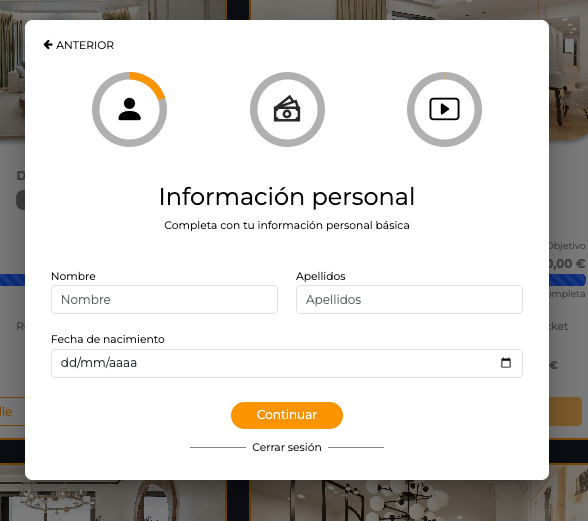
Then it will ask you to state whether or not you are a US citizen or a politically exposed person.
Note: Remember that a politically exposed person is someone who has been entrusted with a prominent public responsibility (High-ranking officials, military personnel, senior executives…)

Finally, complete the personal information section by telling us your profession.
We want to know more about your financial information, such as your regular income, the origin of the funds you will invest in Domoblock, and the percentage that investment represents of your income.

Next, we want to understand your interests as an investor, to know how much fluctuation you are willing to tolerate, what your investment goals are, and what the time horizon for it is.
It is important that you are familiar with the financial instruments Domoblock offers and the risks they entail, as otherwise we will not be able to approve your profile.

That's why we ask if you are familiar with the financial instruments offered by Domoblock and if you have invested in unlisted companies managed by you or others. You must answer "yes" because here you acknowledge understanding the security token; you must say yes, otherwise we will not be able to validate your identity and the verification process cannot be completed.
Basically, a security token is a token that represents a traditional financial instrument such as a bond, a participating loan from a company, etc.

Once the above is confirmed, it will ask you to indicate if you wish to be treated as a professional investor. If you choose to be treated as one, it's because your main activity is investing or because you will invest more than €10,000 per operation.
Next, video identification will be requested, which will consist of taking a photo of the front and back of your chosen identity document: Passport, identity/residence document, or driver's license.
Remember to accept the processing of your personal data, and if you wish, you can access the terms and conditions as well as the privacy policy.
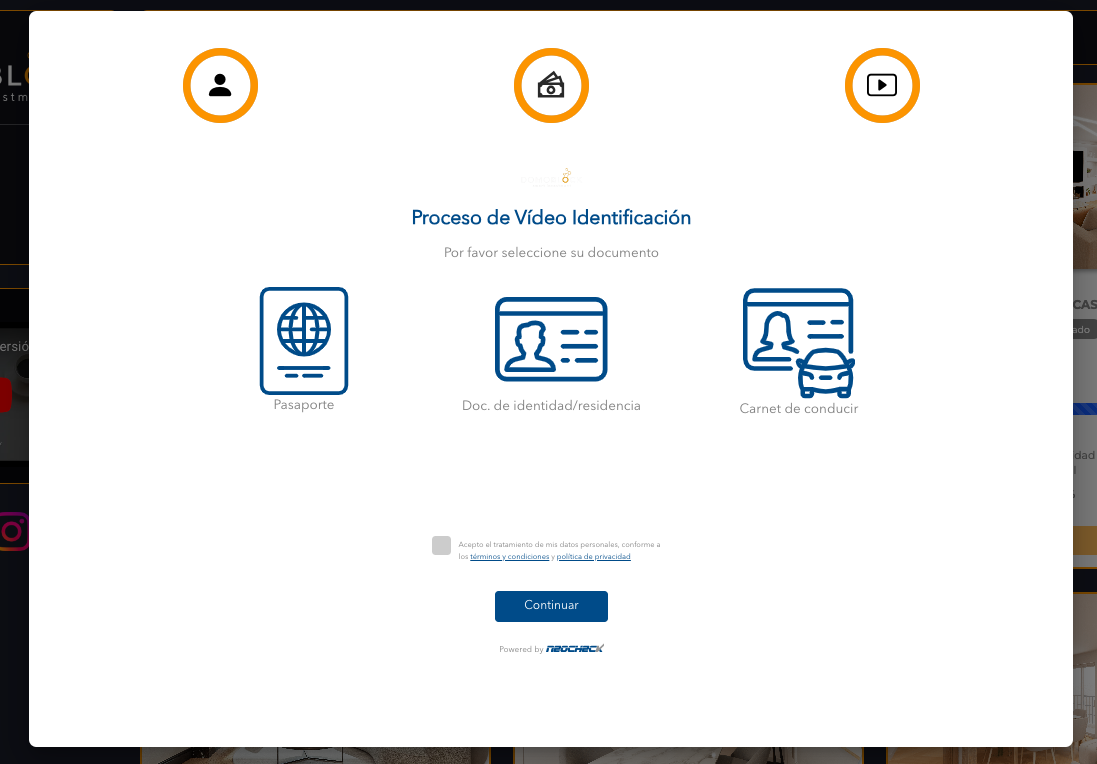
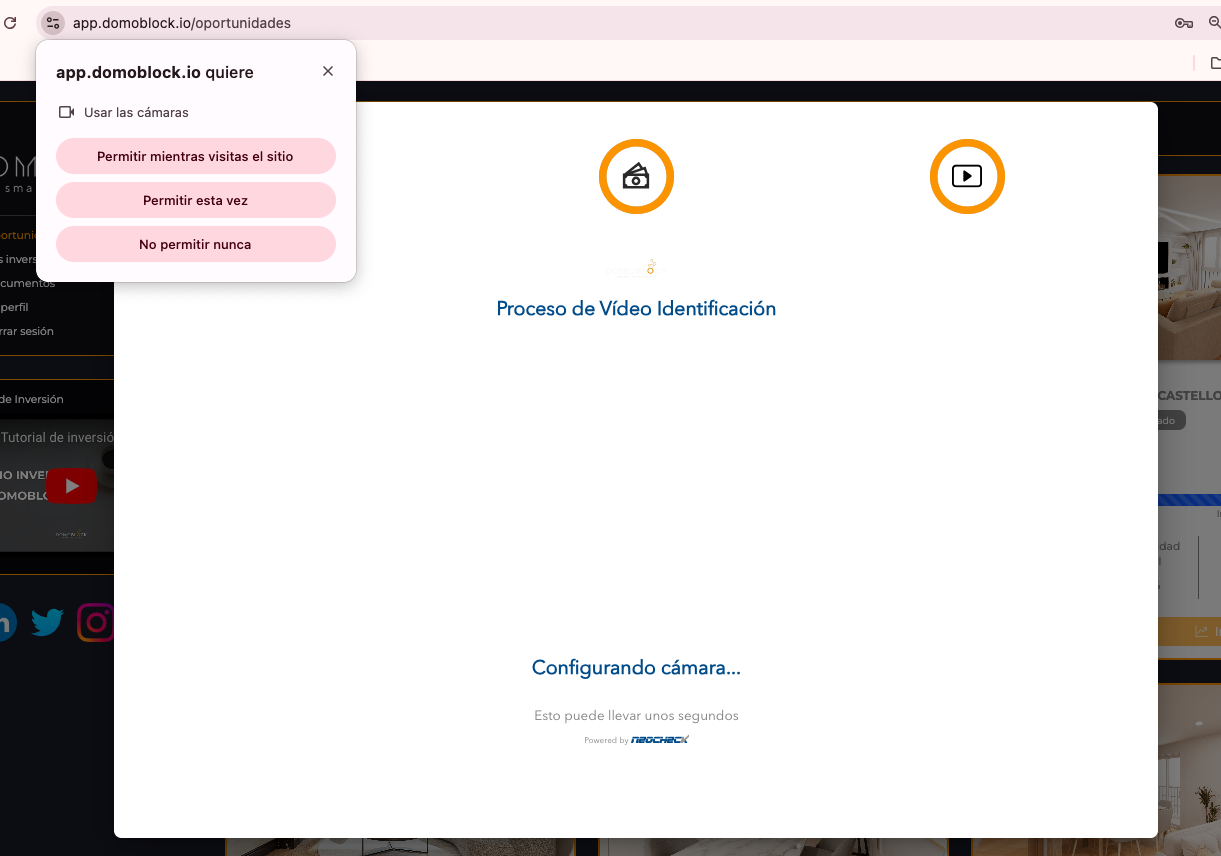
Accept the permissions to access your device's camera. You will use it to take photos of your document along with a selfie.
Once the photos have been taken, you will receive a thank you message and click the "finish" button.
Once the process is complete and if everything went well, your user status will become Accredited. Otherwise, it will be sent for Review, and you will be notified of any detected issues so you can rectify them.
Once this process is complete, it will ask us how we want to invest, whether it's via Blockchain or bank transfer.
In the left panel of the platform, you will find the 'Opportunities' section. This is where you will find all available investment projects.

At the top of the page, you will find useful filters that will allow you to filter each of them:

Once you have explored them, you can delve into the details of each opportunity to make an investment decision. You will find:

If you click “More details,” you will find all the information associated with the project.

In fact, you have access to all the opportunity's documentation, such as its Whitepaper, investment dossier, and token subscription agreement; these will be of great help for you to delve deeper into the opportunity and make the best investment decision.

To start, from the home screen, go to the left-hand menu and click 'Digital wallet'. Two options will appear. To manage your funds in euros, select 'In euros'. Here you will find options to deposit, withdraw, and view your transactions in this wallet.

First, go to the “Deposit money” section, where you will find two options: “Bank transfer” and “Credit card”.

1/ By bank transfer
If you choose 'By bank transfer', you will be given a series of steps to complete the bank transfer. It's like making a transfer to yourself from your bank, which is why the IBAN you see there is unique and exclusive, directly linked to your Domoblock wallet.

The steps you need to follow are: access your bank's application, transfer the money you want to load into your digital wallet using this IBAN, click the orange squares to copy the code, and then paste it into your bank's application.

Please note that it may take between 24 and 72 business hours for the balance to be reflected in your wallet.
2/ By credit card
Here, simply enter the amount you wish to deposit in the “Amount to deposit” field.

You will see a small 0.5% commission. For example, if you deposit €200, an additional €1 will be charged. This commission is shared; the investor pays 0.5% and Domoblock covers the rest. Once you have the amount ready to deposit, you must click the “Perform operation” button. It's important to remember that the maximum per credit card transaction is €2400.

Once you click, a payment link will be generated, and a notification will appear indicating that the payment link has been created and redirecting you to the payment gateway. To complete the deposit, click "Go to payment gateway."

Go to the "Withdraw money" section.

If you don't have a linked account yet, the first thing you need to do is link one. To do this, click "Link account":

A window will open where you will need to fill in the following information:
Finally, click the "Link account" button.

Finally, click the "Link account" button.
Withdrawal with linked account: If you already have one, simply click the "Request withdrawal" option. A window will open where you'll need to select the bank account for the withdrawal and the amount in euros. Once your bank account is linked, you can click 'Request withdrawal', enter the amount you wish to send, and the available balance will be transferred directly to your bank within 24 to 72 hours.
Once you have explored the opportunities, selected the one you wish to participate in, and deposited funds into your digital wallet, it's time to invest.
It's important to note that you can only invest when a project is in "Active" status; this update occurs on a specified date and time. To receive notification of the next investment opportunity opening, we invite you to join our Telegram community where we keep you informed in real-time.
Has the moment arrived when the project is in "Active" status? At this point, you must click the "Invest" button.

Once you have clicked the "invest" button, you will need to wait for the investment data to load:

Next, the interface showing the funding options is displayed. The "Digital wallet" and "Blockchain" options are briefly highlighted (if connected).

Below you will find the most common investment options. If you plan to invest a different amount, click on the "Customize" button. A text box will open directly below where you can enter the number of shares you wish to acquire. Important! It's the number of shares, not €!
Remember that each share is equivalent to €100.

If you want to customize the number of shares, click on "Customize" and a text field will then appear on your screen for you to enter the number of shares you wish to invest.

If one of the share boxes corresponds to the investment you want to make, simply click on it and you will find the details of the future investment at the bottom: The "Amount to invest in Euros", the "Estimated return" which can be viewed as annualized or absolute, and the "Estimated project term".

If, on the other hand, you have customized the number of shares, once you fill in the text field with the number, you will see all the details of the future investment at the bottom: The "Amount to invest in Euros", the "Estimated return" which can be viewed as annualized or absolute, and the "Estimated project term".

Once you agree with the number of shares, you must proceed by checking the button "I agree to subscribe to the legal terms and conditions of the contract". This step represents the signing of the contract for the acquisition of shares, which was previously known as the "Whitepaper".

Once all the previous steps have been completed and you have verified that everything is correct, click on the "Reserve" button to formalize the investment reservation.

Next, a message will appear on screen explaining the following steps to complete your investment. We'll also explain them here: If your reservation falls within the funding target, you will receive an email confirming that your investment has been successfully made. If, on the other hand, your reservation was made after the funding target was exceeded, we will also notify you by email.

One of the platform's new features is the new control dashboard. To access it, you need to click on "Dashboard" in the main menu.

Below you will find the sections "Financial summary", "movements", "my investments", "documents".
In this section, we will specifically explain the "financial summary" section.
.png)
Below, we will explain each of the metrics available in the financial summary:
1. Available balance: This is the total amount of money you currently have in your digital wallet, the same amount shown in the main menu.
.png)
2. Average annual return obtained: This percentage represents the annualized return generated by your investments that have already closed. It's important to note that it's only calculated for completed projects, as it wouldn't make sense to show the return for a project still in progress."
.png)
3. Projects with ongoing investments: This indicates the number of projects in which you currently have capital invested.
.png)
4. Total capital invested: This is the amount of capital currently tied up in active projects.
.png)
5. Capital invested in progress: This is the amount of capital currently tied up in active projects.
.png)
6. Total interest generated: This is the total amount of euros you have earned from your closed investments.
.png)
7. Estimated interest to be received: This is a projection of the interest in euros that your ongoing investments are expected to generate.
.png)
8. Capital withdrawn: This shows you the total capital you have withdrawn from your digital wallet to your bank to date.
.png)
Finally, the "Investment Evolution" chart will allow you to visualize the progress of your investments and gain a more complete overview of all these metrics. In fact, you can download this chart in SVG, PNG, or CSV format. Similarly, you can filter the data you wish to view.
.png)
In this section, we will explore the 'Movements' tab.
.png)
When you access the 'Movements' tab, the operations shown are single transfers of money from your digital wallet to one of the projects. Just below, under 'Investments' (which is usually the default view), you will find all capital movements related to your investments, regardless of the project. For example, if you have made three investments in the same project, here you will see the three individual movements, unlike the 'My Investments' tab where they are grouped.
.png)
To facilitate your search, you can filter movements by date range, by movement type, whether in euros or via blockchain, and also by amount.
.png)
It is important to note that, in the web version, this view may show the details of each operation. In the mobile version of the platform, to see detailed information for each transaction, simply tap on the movement you are interested in.
Next, we have the 'Transfers to Wallet' sub-tab. Here you will see fund movements made to your wallet from projects that have concluded or that have made a capital or interest repayment. You can also filter these movements by date and amount, as in the previous example.
.png)
In this section, we will explore the 'My Investments' tab. Here you will find all the investments you have participated in, grouped by project.
.png)
By default, you will see the 'Digital Wallet' button. This shows all investments you have made using euros in the traditional way. For each investment, you will see key information such as the Project, Term, Expected Return, Capital Invested, current Project Status, and the 'More info' button. You can also filter "my investments" using the table buttons.
.png)
Click the “More info” button if you want to find more detailed information about this investment.
.png)
.png)
If the project you are viewing has already concluded, you will find a "Return on Investment" button here to claim your funds.
.png)
If you are viewing a project that has already been completed and you have already withdrawn your investment, you will find a window like the one shown below.
.png)
Now let's explore the "Documents" tab.
.png)
Here you will find all subscription contracts related to your investments in Domoblock. This is what we previously knew as the 'whitepaper,' the agreement between you and Domoblock to participate in each project.
You will see a list of all contracts for the projects you have invested in. For each one, the project name and the contract creation date are displayed. Additionally, you have a button to download the document in PDF format.
.png)
In the left panel, locate the “Referrals” section; in this section, you'll find all the information you need to be part of our Referral Program.
.png)
We'd like to take this opportunity to explain how Domoblock's Referral Program works, which you can explore on the platform. It's an excellent way for both you and your friends to earn extra benefits while investing. Before we begin, it's important to highlight two points:
First, you'll find the “Program Conditions” section, where you'll find all the information related to the program and resolve any questions you may have about it.
.png)
You might be wondering, what do I gain by inviting a friend?
It's very simple: for every friend you invite to Domoblock, you earn €50, and your friend also earns €50. This way, both of you start with an advantage!
.png)
How can I unlock the bonus? This bonus is unlocked in two key steps. First, when your friend makes their first investment of at least €500, you, as the referrer, will receive 50 and 100 points that you can use whenever you wish. Additionally, your friend will unlock their €50 bonus. Second, if that same friend makes a second investment of at least €500, then they will be able to use or redeem their bonus on the project of their choice.
It is very important to note that if the friend does not make that second investment, their bonus will remain pending and cannot be redeemed with just one investment. It is also important to remember that both you and your friend have 6 months from the bonus unlock date to use it.
If you have specific questions about the program, you'll find the most common questions; click on them to expand the associated information. We'll show you below:
important
.png)
If you click on the “How do I refer a friend?” section, you'll find a step-by-step guide to referring a friend.
.png)
Here, we'll also briefly explain how to do it. First, you need to make sure your friend has already registered with Domoblock. Then, access the referral form found right there:
.png)
Complete this form with the following fields: your referral's name, email address (the one they used to register), and your email address (the one you registered with Domoblock).
In the “Tutorials” tab, you'll find several videos that will help you understand program management and much more.
.png)
From the left panel, you'll find the “Help” button. This section is designed for when you have questions or need assistance.
.png)
If you need a step-by-step visual guide on how to make an investment, head to the 'Investment Tutorial' section. Here you'll find a specific video that will guide you through the entire investment process in a practical way.
Below the investment tutorial, you'll find our primary and most comprehensive source of information: our 'Investment Guide'. This Investment Guide is the very document you are currently reading.
If, after consulting the guide, you still have questions or need personalized assistance, you have several ways to contact our team directly through the 'Contact Us' section on our website.
You can send us a message via the contact form, and we will respond as soon as possible. You also have the option to request a personalized video call with one of our specialists. We will help you step-by-step, answer your questions, and explain anything you need to know about the platform or investment projects. Simply choose the day and time that works best for you.
The acquisition of tokens from the borrower (Domoblock) commits the lender (investor) to a non-tokenized participating loan (Project).
The returns resulting from the project carried out between Domoblock and the investor (whether an individual or a legal entity) will be considered income from movable capital and will be subject to withholding tax.
Domoblock is obliged to file and pay these returns to the Tax Agency (According to Articles 75.1.b of the Personal Income Tax Regulation and 128 of the Corporate Income Tax Law).
Domoblock will apply withholding tax on the income (returns) obtained from the sale of the project, according to the following characteristics:
While the primary responsibility for income taxation lies with Domoblock, it is important for each investor to fulfill their personal obligation to declare capital gains in their respective tax returns. Depending on the country of residence and other income obtained from loans or other financial instruments, the tax percentage may need to be adjusted. Investors must declare this income in their savings base, under the category of "income from movable capital" as "income obtained from the assignment of own capital to third parties" (Article 25.2 of the Personal Income Tax Law).
In Spain, tax brackets are determined by law, and we summarize them below:


.png)
.png)
.png)
.png)